Speed display.
Changed wheels or pulleys? Estimate why the speedometer is off, then find the setting your remote offers.
Your wheel setup
Enter the installed wheel diameter and, for a belt drive, the pulley teeth. Add the previous setup only if you know it.
If you’re keeping a pulley, enter its tooth count in both columns.
Wheel size and gearing determine distance traveled per motor rotation. Comparing before and after requires both setups.
Find the display setting
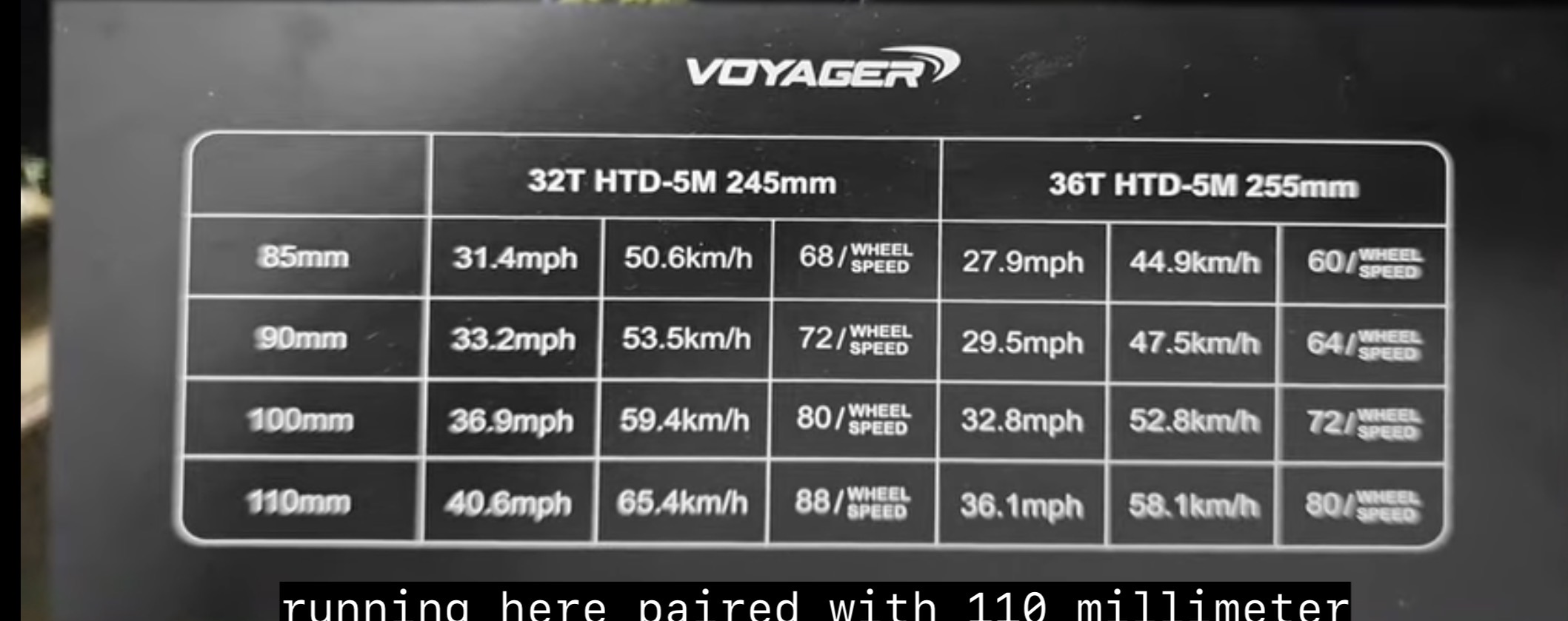
Voyager factory chart
Use the installed wheel diameter and wheel-pulley teeth from the form above. The eight chart combinations return exact values; others show an estimate. No previous setup is needed.
Uses the installed wheel diameter and wheel-pulley teeth entered in the setup form above. Select Belt drive.
Exact values come from the supplied Voyager chart. Other results extend its wheel-size and pulley-ratio pattern and are estimates, not manufacturer settings. The chart assumes its original motor pulley and does not give belt lengths for other setups. Verify an estimated setting against GPS.
View original Voyager chart
Estimate a Wheel Speed value
For a Voyager, choose “Meepo Voyager · Wheel Speed” above; its chart needs no current setting. This fallback is for other Meepo boards. Enter the current setting to estimate a correction, with optional GPS and remote readings from the same ride.
Enter the current Wheel Speed setting for a setup-based starting estimate. Meepo does not publish a general formula; verify against GPS.
The full checklist below works with any board. Select your exact remote for verified menu details.
For hub or direct drive, select that drive type and enter the wheel diameters. Tire wear, inflation, and deformation can change effective rolling diameter. Remote-reading estimates assume its old setup was calibrated and it derives speed from motor rotation; firmware may behave differently.
What the remote may show
The percentage describes the mismatch if your remote still uses the old setup. It is not a value to enter into the remote.
At fixed motor RPM: speed change = (new wheel ÷ old wheel) × (old gear ratio ÷ new gear ratio), where gear ratio = wheel pulley teeth ÷ motor pulley teeth. This does not predict maximum speed.
Sources
Calculations describe ideal geometry. Actual ride speed and remote behavior depend on the board and its firmware.